
1. Question / Symptom
Why does the fluxer make an extra pass when the machine is configured in metric units?
2. Explanation
The fluxer spray segment width is based on a value that is converted from metric to imperial units before it is transmitted to the fluxer. The conversion and the fluxer's spray increment can result in a metric value that does not divide evenly across the required coverage. The fluxer then makes an additional pass to ensure the entire board is covered.
The fluxer was originally set up around inch-based values, with 0.1 inch as the smallest increment. When the corresponding value is expressed in metric units, the converted value may not divide evenly; the additional pass is the result of ensuring full coverage.
3. Spray Segment Width: Current Operation
Several fluxer models have been used on these wave machines, including the current three fluxer models and earlier models. The Spray Segment Width field on the Fluxer Configuration page is greyed out and is not applicable or adjustable on the ServoJet Fluxer.
For the ServoJet Fluxer, the active value is the Spray Segment Width Setpoint entered in the recipe on the Operations page. This setting was changed from a configuration item to a recipe item following customer requests for the spray segment width to be adjustable by recipe.
4. Software Verification
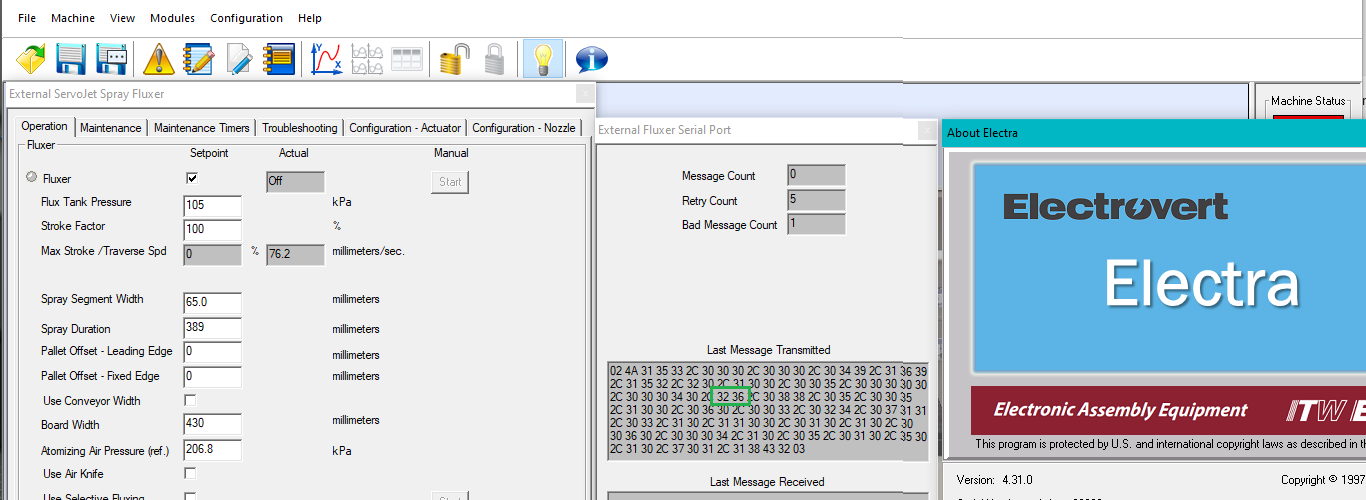
The behavior was checked using Electra software version 4.31.0. A Spray Segment Width of 65.0 mm was entered on the Operations page. The External Fluxer Serial Port was opened from the Modules menu to verify the value transmitted to the fluxer.
The value highlighted in green in Figure 1 is the transmitted value. It represents 2.6 inches. The software converts the metric value to imperial units before sending it to the fluxer. This conversion method has not changed; it was used when Spray Segment Width was a configuration item and continues to be used now that the value is supplied as a recipe item.
5. Recommended Setup
To achieve the desired number of passes, set the Spray Duration smaller than the Spray Segment Width. This is the recommended adjustment identified during the review of this behavior.
Note: The source information does not provide a universal numeric setting for Spray Duration. Set the value according to the required board coverage and verify the resulting spray pattern.
6. Reference Image
Figure 1 shows Electra v4.31.0 with the External Fluxer Serial Port window open. The green outline identifies the transmitted Spray Segment Width value.
7. Summary
The extra pass in metric operation is associated with the conversion of the Spray Segment Width from metric to imperial units and the inch-based 0.1-inch spray increment. The software continues to transmit the converted value using the same method as before. On the ServoJet Fluxer, set Spray Segment Width in the recipe on the Operations page. Adjust Spray Duration to be smaller than Spray Segment Width when targeting a particular number of passes.