
How to repair a Centurion Communication Error.
- Exit out of the machine software.
- Go into the PC’s Device Manager. To get to this screen click on the Windows icon on the bottom left of the screen and then do a search for Device Manager.
- In the window that opens scroll down to Ports (Com & LPT) and click on the arrow to the left of it so that you can see which devices are under it.
- The machine should have 4 Sunix Com Ports labeled COM1 – COM4. This is what the Centurion software uses.
- See if there is an additional Communication Port (COM1) shown on the screen as shown below.
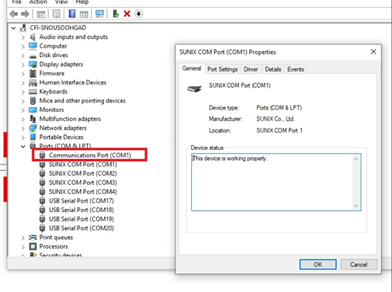
- If there is, right click on the Communication Port (COM1) and choose Disable. In the new window that opens click on Yes, that you want to disable it.
- Restart the PC and then the machine software. Test to see if communication is established.